 01
Create Your Account
Create your free teacher profile and access your dashboard.


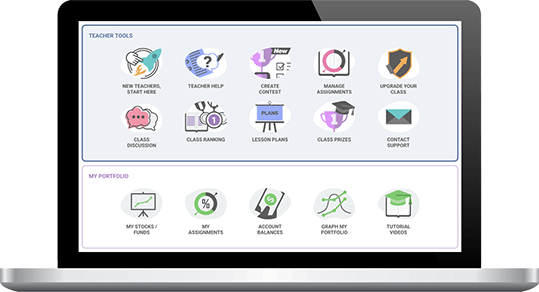
We are the #1 Free Stock Game for a reason – fast setup, easy to get your students registered, simple reports you need, and the best real-time stock game on the market.
No real money. Easy classroom setup. Built for educators.
Create Your Free Teacher Account See How It Works ↓Free for teachers and students • Set up your class in under 10 minutes
From sign-up to first trade, the whole flow takes minutes.
01
Create your free teacher profile and access your dashboard.
 02
Choose your dates, starting cash, trading rules, and create assignments.
 03
Share your class link so students can register and join.
 04
View student portfolios, monitor trading activity, see class rankings, and more.
Pick the length that fits your course.
Best for introducing investing and portfolio basics.
Gives students time to research, invest, and see how markets change.
Combine investing with lessons, research, assignments, and portfolio analysis.

Not sure what to do on Day 1? Here’s an easy way to get started:
For Personal Finance, the key is to keep the starting cash to something tangible for students starting their first job, and settings similar to what they would see in Robinhood or their first retirement account. This means low starting cash, no day trading, and position limit* rules to make sure students do not forget diversification.
For an investments class or investing club, you will want the game to more closely resemble managing an investment fund. This means higher starting cash, working with margins, and a broader range of security types – while enforcing even stricter position limits* to encourage greater diversification.
A “Free-For-All” contest is an advanced type of contest where participants have fewer restrictions and greater starting cash. This is used as a “fun side project” for classes, or for student investment clubs that want to allow their participants play around with whatever strategy they want to try out. There is a lot of starting cash, and very few restrictions on what can be done with it.
HowTheMarketWorks does not feature derivatives trading, but our premium, ad-free versions at PersonalFinanceLab.com (K-12) and StockTrak.com (Higher Ed) also include international markets, bonds, options (both simple and spreads), forex, futures, future options, and cash spots. Additional options include weekly deposits (to mimic continuous retirement contributions), team portfolios, and more advanced customization to suit your unique class needs.
HowTheMarketWorks includes educational content you can use before and throughout your simulation.


Your teacher dashboard makes it easy to monitor participation, portfolios, and student progress.
Teacher Tip: The student with the highest portfolio return isn’t necessarily the student who learned the most. Consider evaluating the decisions and learning behind the portfolio — not just the final balance.
Did the student actively participate throughout the simulation?
Did they research investments before making decisions?
Did they build a portfolio that demonstrates an understanding of diversification?
Can they explain the reasoning behind their investment choices?
Did they complete the lessons and activities you assigned?
Can they explain what worked, what didn’t, and what they would do differently?
Teacher Reports can help you monitor student portfolios, trading activity, participation, and progress throughout the simulation.
Explore Teacher Reports →HowTheMarketWorks is designed with teachers, students, and school requirements in mind.

Built specifically for classroom use.

Designed with student data protection in mind.

Support for school privacy requirements.

DPAs are available for schools and districts.

Existing agreements are already available in several states.
Everything you need to get your class up and running.


Need options, futures, forex, international markets, team portfolios, or more advanced customization?
Advanced investing simulations plus personal finance curriculum and classroom tools.
Explore PersonalFinanceLab →Advanced portfolio simulations for college and university courses.
Explore StockTrak →Not sure which platform is right for your class?
Book a DemoCreate your free teacher account and have your stock market simulation ready in under 10 minutes.
Create Your Free Teacher AccountFree for teachers and students. No credit card required.